
Download MemoryCleaner – Free RAM Cleaner for Windows & Mac | Secure, Lightweight Memory Optimization Tool
MemoryCleaner is a lightweight, free software tool designed to help users optimize their computer's memory performance by clearing unnecessary RAM usage. Ideal for those experiencing sluggish system performance, MemoryCleaner provides a simple yet effective solution to free up memory and boost system responsiveness. With a minimal interface and no intrusive ads, this tool is perfect for beginners and casual users seeking a hassle-free way to improve their device’s speed.
Whether you're using a Windows PC or a Mac, MemoryCleaner runs efficiently in the background, helping to reduce lag, speed up boot times, and enhance multitasking capabilities. The app is especially useful for older machines or systems with limited RAM, where memory clutter can significantly impact performance. Despite its simplicity, MemoryCleaner delivers tangible results, making it a reliable choice among similar tools like Wise Memory Optimizer and Windows Memory Cleaner.
It’s a secure, portable, and completely free application that requires only 2 MB of disk space, making it one of the most efficient memory optimization utilities available today.
Simple, Efficient Interface for Instant Memory Cleanup
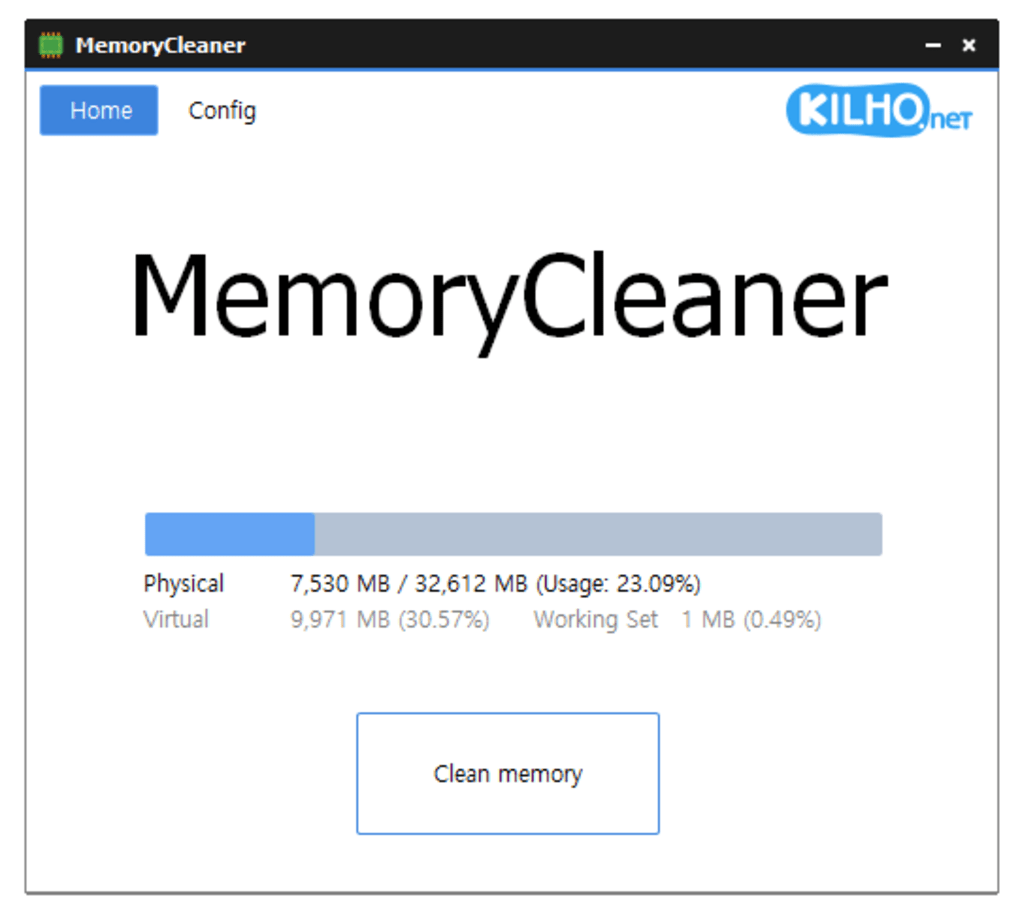
One of the standout features of MemoryCleaner is its incredibly intuitive and user-friendly interface. Unlike many system optimization tools that overwhelm users with complex settings and technical jargon, MemoryCleaner keeps things refreshingly simple. Upon launching the app, users are greeted with a clean, minimal dashboard featuring a single prominent button labeled “Clean Memory.” This direct approach eliminates confusion and allows even non-technical users to start optimizing their system in seconds.
The simplicity doesn’t stop at the layout. The app operates on a “set it and forget it” philosophy. There are no complicated configuration options, no sliders to adjust memory thresholds, and no need to understand how RAM works to benefit from the tool. Just click the button, and MemoryCleaner instantly identifies and clears inactive memory blocks, freeing up valuable system resources. This makes it ideal for users who want immediate results without spending time learning how to use the software.
Beyond the basic cleanup, the app includes a basic scheduling feature that allows users to automate the memory-cleaning process. You can set it to run at startup, at regular intervals (e.g., every 30 minutes), or manually trigger it when needed. While the scheduling options are limited compared to more advanced tools, they are sufficient for most casual users who want consistent performance without manual intervention. The app runs quietly in the background, consuming minimal CPU and memory, so it won’t interfere with your daily tasks. For those who value efficiency and ease of use, MemoryCleaner’s interface strikes the perfect balance between functionality and simplicity.
Lightweight & Secure: Perfect for Low-End and High-Performance Systems Alike
MemoryCleaner’s small size and low system impact are among its most compelling advantages. At just 2 MB in size, the app is one of the lightest memory optimization tools available. This makes it easy to download, install, and store on any device, even those with limited storage space. The lightweight footprint ensures that the software itself doesn’t contribute to system slowdowns, a common issue with bloated optimization tools that consume more resources than they save.
Despite its minimal size, MemoryCleaner performs its core function effectively. It doesn’t rely on complex algorithms or background services—instead, it focuses on identifying and releasing unused RAM chunks that accumulate over time due to background applications, browser tabs, or system processes. This helps prevent memory leaks and reduces the likelihood of crashes or freezes, especially during intensive tasks like video editing, gaming, or running multiple programs simultaneously.
Security is another strong point. The app is completely free, with no ads, no bundled software, and no in-app purchases. It does not collect user data or send information to remote servers.
This transparency builds trust and ensures that your privacy remains intact. Additionally, MemoryCleaner is compatible with both Windows and Mac operating systems, making it a versatile choice for users across platforms. Whether you're using a Windows 10/11 laptop or a MacBook with macOS, you can download and use the tool without compatibility issues.
Its secure, portable design means you can even run it from a USB drive if needed, making it a great option for temporary system optimization on shared or public computers.
Pros and Cons: Is MemoryCleaner Right for You?
- Pros:
- Completely free with no ads or hidden costs
- Extremely lightweight (only 2 MB download size)
- Simple, intuitive interface suitable for beginners
- Runs quietly in the background with minimal resource usage
- Supports automatic scheduling for regular cleanup
- Available for both Windows and Mac users
- Secure and privacy-focused with no data collection
- Cons:
- Limited customization options for memory cleaning
- No advanced features like real-time monitoring or memory usage graphs
- Scheduling options are basic and not highly flexible
- Doesn’t provide detailed reports or diagnostics
- Best suited for casual users; not ideal for power users or IT professionals
Frequently Asked Questions (FAQ)
Conclusion: A No-Frills Tool for Quick Memory Optimization
If you're looking for a straightforward, reliable way to free up memory and improve your computer’s speed, MemoryCleaner is a solid choice. Its minimalist design, secure operation, and lightweight nature make it perfect for users who want a simple solution without the complexity of advanced tools. While it lacks the depth of features found in premium memory optimizers, it excels in what it does: quickly and safely freeing up RAM with minimal effort.
For casual users, students, or anyone managing an older device, MemoryCleaner delivers real value. It’s fast to install, easy to use, and completely free. Whether you're preparing for a presentation, gaming, or just browsing the web, a cleaner memory means a smoother experience.
Download MemoryCleaner today and give your system a performance boost—no setup, no hassle, just faster results.







